Building AI Voice Agents: 3 Lessons to Fix Latency and VAD
At DataGOL, we build intelligent agents that help our customers drive business value by helping gather intelligence, automating workflows, and making real-time decisions through natural language. Our agents were already performing well in the text modality, powered by LangGraph for orchestration, tool-calling, and seamless communication with our memory and context layer. As adoption grew, so did the calls to bring voice capabilities to our agents.
This article covers how we engineered our enterprise-grade voice agents — preserving our existing agents’ reasoning capabilities, conversation memory, and contextual awareness, without touching their core logic.
The Challenge: Voice Is Not Just “Text With a Microphone”
When we started exploring voice capabilities, our first instinct was straightforward — take the user’s speech, transcribe it, send it to our existing agent, and read the response back. A simple STT → LLM → TTS pipeline. It broke almost immediately. The problems were fundamental.
1. Latency kills conversation: In a text chat, a 2–3 second response time feels instant. In a voice conversation, it feels like the agent crashed. Users would repeat themselves, interrupt, or hang up. Our agents — which call multiple tools before responding — could take 3–5 seconds to produce a complete answer. That’s an eternity in spoken dialogue.
2. Turn-taking is hard: Humans don’t wait for a clean “end of message” signal. They pause mid-sentence, use filler words, and expect the agent to know when they’re actually done speaking. A naive approach would either cut users off mid-thought or wait far too long before responding.
3. Tool calls create dead air: Our agents call internal and external tools via API or MCP. During tool execution, there’s no text being generated. In a text chat, users see a loading spinner. In voice, they hear silence. And silence breeds confusion.
4. Agentic loops don’t map to streaming: Agents think in cycles: reason → call tool → observe result → reason again. Standard voice pipelines expect a linear flow: input → process → output. These two paradigms had to meet somewhere.
The Solution: A Custom LangGraph Frame Processor Inside Pipecat Voice Pipeline
Rather than retrofitting voice onto our agents as an afterthought, we built a bridge between these two powerful frameworks — letting each do what it does best.
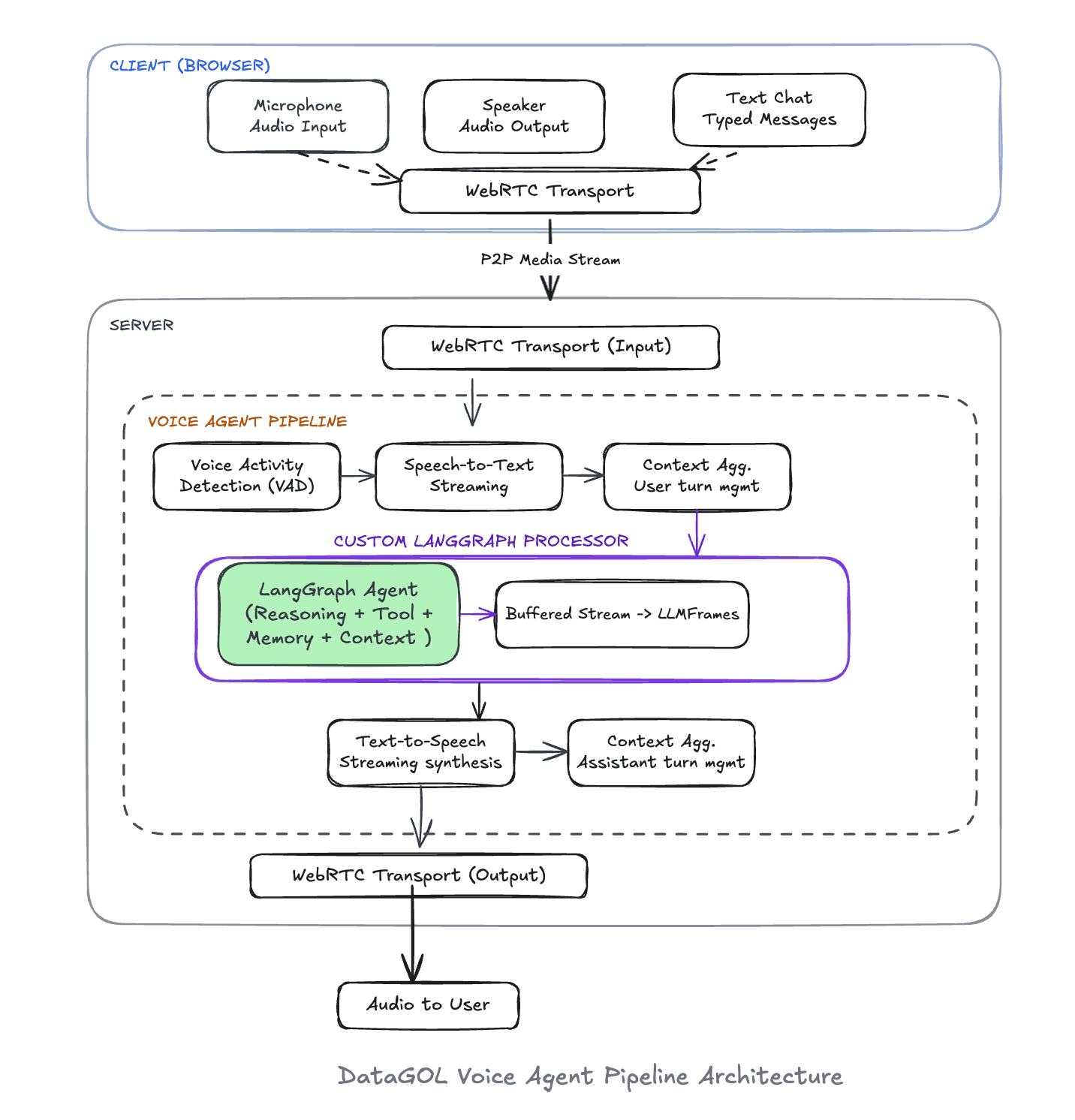
The pipeline flows from the browser through a WebRTC transport into the server, where audio passes through Voice Activity Detection (VAD), Speech-to-Text, a context aggregator, and into our custom LangGraph Processor — the heart of the system. This processor wraps a compiled graph and translates between Pipecat’s frame-based streaming world and LangGraph’s event-driven agentic world. The output then flows through Text-to-Speech and back to the user over the same WebRTC connection.
The key insight was building a custom LangGraph Processor — a Pipecat ‘FrameProcessor’ that sits at the center of the pipeline. It receives transcribed user messages as frames, invokes the LangGraph agent with streaming enabled, and emits sentence-buffered text frames that flow directly into TTS synthesis. Same agent. Same tools. Same memory. Just a wrapper to give a new interface.
Why Pipecat: The Right Abstraction for Real-Time Voice:
We evaluated several approaches to adding voice, from building a raw WebSocket pipeline to using hosted voice-agent platforms. Pipecat stood out because it models voice AI as a pipeline of composable frame processors, which aligns perfectly with how we think about our system.
Everything in Pipecat is a frame — raw audio from the microphone, transcribed text from STT, etc.— and each processor in the pipeline receives frames, transforms them, and pushes new ones downstream. We had to build a new processor — the bridge between our agent and the voice pipeline— and slot it in:
Each stage is independently configurable, swappable, and testable. When we wanted to switch from one TTS provider to another, we changed one configuration. When we needed to tune speech detection sensitivity, we adjusted VAD parameters without touching the agent logic.
WebRTC Gave Us an Edge
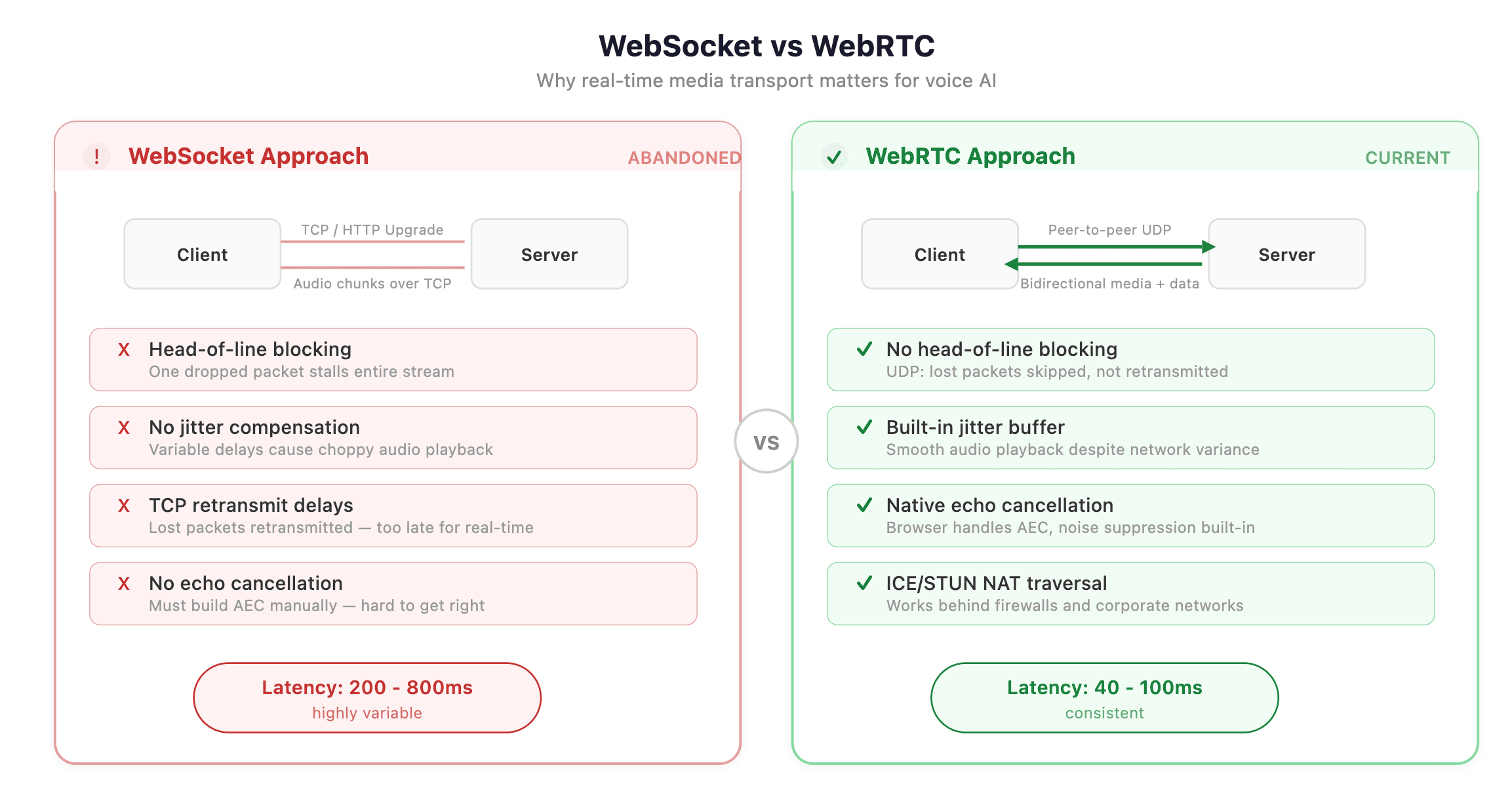
Early prototypes used WebSocket-based audio streaming. It worked — until it didn’t. We hit buffering issues, inconsistent latency spikes, and the fundamental problem that WebSockets weren’t designed for real-time media.
Switching to WebRTC changed the game. It was the difference between a voice agent that feels like a phone call and one that feels like talking to a bad Bluetooth speaker.
The Details That Drove It Home
The architecture diagram tells the “what and how” The nuances tell the “why it feels right.”
1. Intelligent Speech Detection with Tuned VAD
We tuned the Voice Activity Detection(VAD) to be more selective about what counts as speech, requiring higher confidence before triggering. We also adjusted speech onset detection to react faster when someone starts talking, while giving users more breathing room before the system decides they’ve finished speaking. The silence duration before end-of-turn parameter — turned out to be the most critical. Too short, and the agent cuts users off mid-thought. Too long, and there’s an awkward pause before every response. Finding the sweet spot made the difference between a frustrating prototype and a natural conversation.
2. Sentence-Buffered Streaming: Don’t Say Half a Word
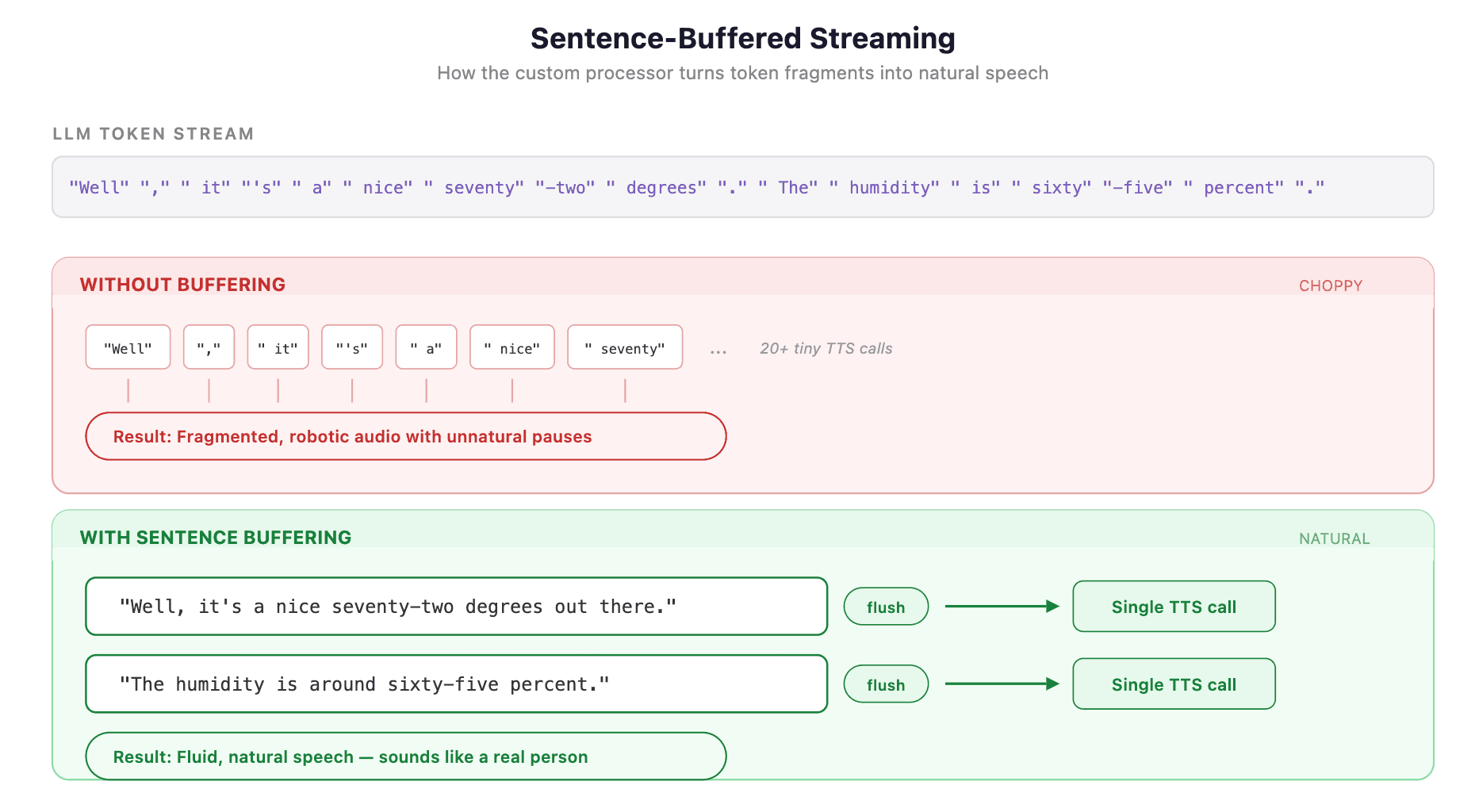
One of the most important optimization in the system happens inside the custom LangGraph processor. When our agent streams tokens, each token arrives individually — sometimes a single word, sometimes half a word.
Sending each token directly to TTS would produce choppy, robotic speech with unnatural pauses. Instead, we buffer tokens and flush at sentence boundaries:
3. Eliminating Dead Air During Tool Execution
When the agent decides to call a tool — say, fetching weather data — the LLM stream pauses. No tokens are being generated. In a naive pipeline, the user hears silence.
Our processor handles this by flushing any buffered text before a tool call begins:
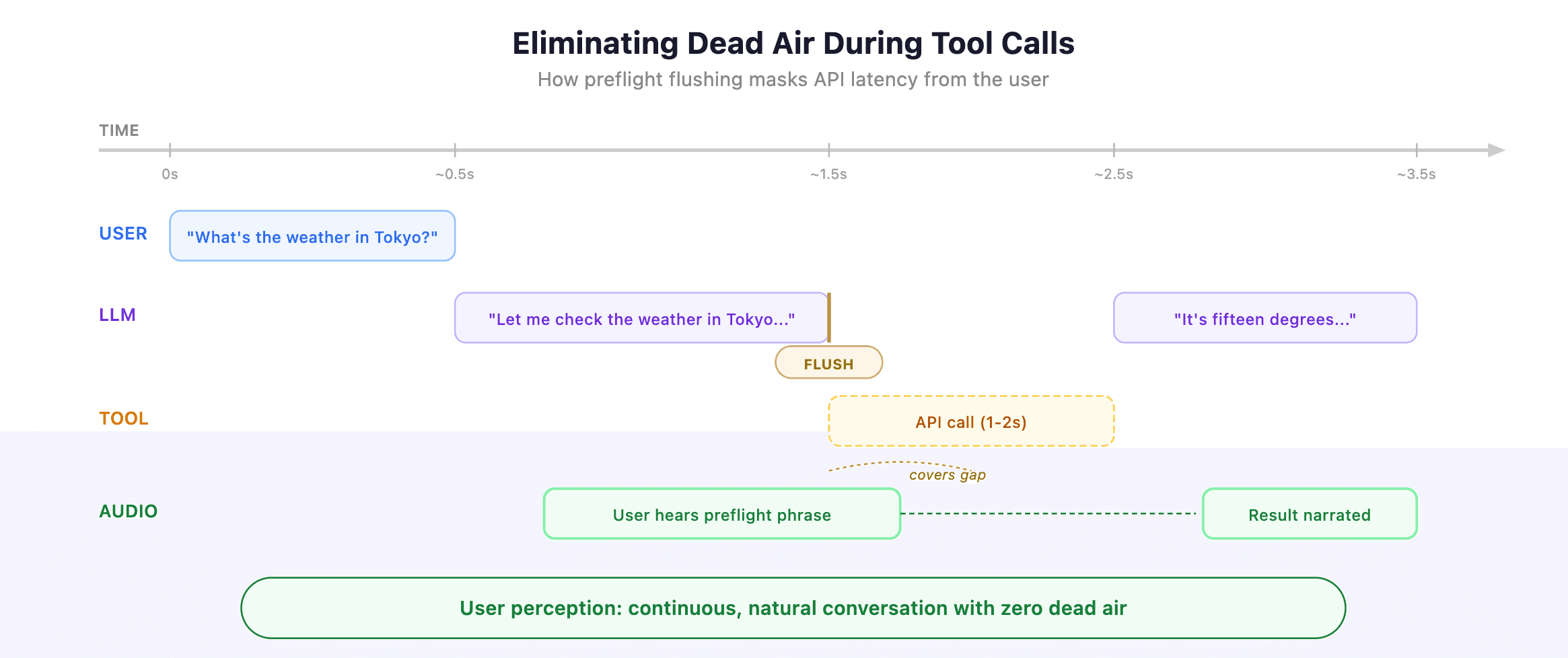
The preflight phrase (“Let me check…”) isn’t filler — it’s the LLM’s natural response before making a tool call. By flushing it immediately, the user hears conversational acknowledgment while the tool executes in the background. The result is seamless: the agent sounds like it’s thinking rather than frozen.
4. Dual-Mode Input: Voice and Text, Same Connection
Not every interaction should be spoken. Sometimes users want to paste a product ID, type a URL, or send a precise query. Our architecture supports both voice and text input over the same WebRTC connection.
Text messages arrive via the WebRTC data channel as app messages, get injected into the conversation context, and trigger the same agent. The user can speak a question, then type a follow-up, and the agent maintains full conversational continuity.
What’s Next
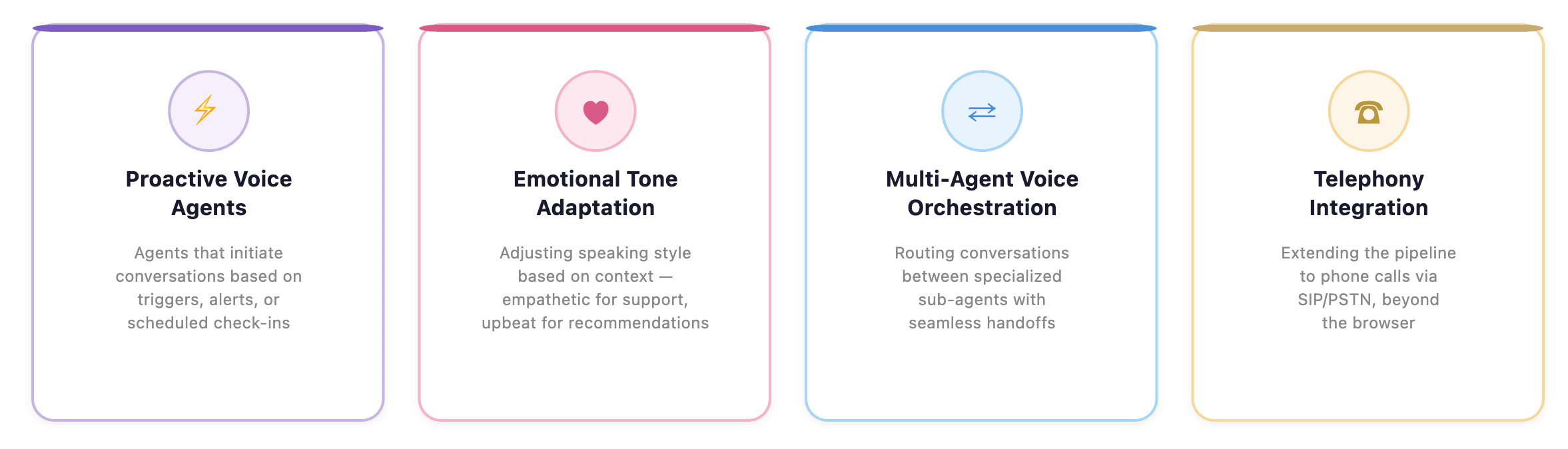
We’re actively working on several fronts:
The voice AI space is moving fast, but instead of building our voice agents from scratch, we took a plug-and-play approach to making our existing, battle-tested agents speak.
The combination of Pipecat’s composable pipeline architecture, WebRTC’s real-time transport, and a custom LangGraph frame processor gave us the best of both worlds — the reliability of our proven agent logic with the immediacy of natural conversation.
If you’re building agents with LangGraph and thinking about voice, you don’t need to start over; you just need a bridge.

DataGOL Accelerates Product Innovations for Remo
Problem
Building post event dashboards was too resource intensive, and less effective led to slowing their growth.

Author
Jyotish Bora
Jyotish Bora is a visionary technology strategist with over 18 years of experience driving digital transformation across global organizations. Based in Chicago, Jyotish serves as VP of Engineering at DataGOL, following strategic roles at Lab49 and InComm Payments. He specializes in crafting forward-thinking AI adoption strategies and architectural roadmaps that guide companies through technological evolution. He holds a Master of Science in Computer Science from Clemson University and a Bachelor of Science from the National Institute of Technology, Bhopal, India.